


c
Remarkably easy to configure and use
This is proving far more useful than I had initially conceived (even after all the research I did on it before purchase). Other review here and elsewhere will talk about its functionality, so let me address some points you may not get elsewhere.
I'm using it on my Mac Mini (running Big Sur) and haven't encountered any incompatiblities or problems. It's been absolutely fantastic for my teaching online as it effortlessly allows me to control not only OBS and my Atem Mini but also PowerPoint (for slides) and VLC (for various media clips) *in the background* while Zoom takes centre-stage - which is absolutely fantastic.
Using Bitfocus Companion, my Elgato can do quite complex things with OBS, Atem Mini (via Software Control) and Reaper.
Finally: yes, a lot of its functionality (if not all of it) can be replaced with software (e.g. AutoHotKeys and macro keyboards) but this is easy to setup, simple to use, and wonderfully tactile.
Could this be cheaper? Well, I certainly balked at the price, and cannot say it warrants *all* its high price. But if the price doesn't bother you too much, what I can say is that it does all that it promised (me!) and more.
I'm using it on my Mac Mini (running Big Sur) and haven't encountered any incompatiblities or problems. It's been absolutely fantastic for my teaching online as it effortlessly allows me to control not only OBS and my Atem Mini but also PowerPoint (for slides) and VLC (for various media clips) *in the background* while Zoom takes centre-stage - which is absolutely fantastic.
Using Bitfocus Companion, my Elgato can do quite complex things with OBS, Atem Mini (via Software Control) and Reaper.
Finally: yes, a lot of its functionality (if not all of it) can be replaced with software (e.g. AutoHotKeys and macro keyboards) but this is easy to setup, simple to use, and wonderfully tactile.
Could this be cheaper? Well, I certainly balked at the price, and cannot say it warrants *all* its high price. But if the price doesn't bother you too much, what I can say is that it does all that it promised (me!) and more.
8
0
Report
N
I'm happy!
I ordered it as a gift for my friend (she is a streamer). Unfortunately, she lives very far away, and I have not yet reached her to give this streamdeck in person, but I tried to connect it to my laptop - everything works perfectly! I never doubted the quality of Elgato products, as they are leaders in the production of such equipment. Special thanks to the Thomann store for the fast delivery, as well as for offering the lowest price I could find! Greetings from sunny Bulgaria!
0
0
Report
UD
Incredibly useful device for Mac or PC
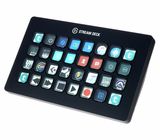
I only heard about these when Whytse did a studio workflow video. I was a bit taken aback that such a thing even existed and that I hadn't heard about them. I should say if you have a spare phone then you can use the software to achieve the same with a touchscreen but I love this thing! It comes with a very stable stand that it clings to magnetically. This also doubles up as a cable tidy. Each button is a mini LCD screen and displays an icon to remind you what it does. The XL is the perfect size for me with 32 buttons but you must remember that you are not limited to 32 functions because you can flip between different pages which allows for the grouping of commands by software task. A download of the free app Companion allows you to create your own commands, such as adding specific plugins, so it is very useful for music production. I have used Editors Keys keyboards in the past but this is updateable and very flexible. I can see me wanting a second soon!
0
0
Report
AS
Most intuitive way to control your stream/workflow
This piece of tech might seem unassuming but don’t let that fool you. It can connect with all your favorite applications and control them effortlessly. Highly recommended for any type of workflow.
0
0
Report
K
Amazing lil device
Very practical "shortcuts panel" that can be configured in really amazing ways. It would be really missed if not available in my setup. Works very well, but must be connected directly to the computer.
Actually, this is the only draw back. It must be plugged directly into the computer, which for me (mobile workstation / laptop]ew user) is a minus. It also starts when connected to a powered USB hub, but its behavior is unreliable and sluggish if it is not directly connected to the computer.
Actually, this is the only draw back. It must be plugged directly into the computer, which for me (mobile workstation / laptop]ew user) is a minus. It also starts when connected to a powered USB hub, but its behavior is unreliable and sluggish if it is not directly connected to the computer.
2
0
Report
S
The mount is designed mostly for irregular macro use, sitting off to the side, which means it's inadequate for my use. I usually use without stand, as if it were a keyboard. The cable placement isn't ideal and the included (albeit quite nice) cable is far too short. Otherwise, it does everything I need it to. All I'd want is direct integration with more programs.
0
0
Report
MT
Any hotkeys or macros, in unlimited ways
On the surface, it is s 32 freely assignable buttons for streaming.
As you start digging in the software, you realize it can execute macros, run apps, control the system, insert special characters and automate a whole bunch of tasks.
You're not limited to 32 commands: you can have folders of commands, and folders within folders, and even more folders within those folders. With enough folder nesting, you can stuff this control surface with as many macros as you want.
I use this for editing video and text, inserting special characters and emojis, adding Ableton devices, sending template responses in email, timing my screencast recordings and setting alarms to make sure I don't work late into the night. It also monitors my CPU usage and helps me tag my photos as I sort through them after a photoshoot.
A very handy a versatile package.
As you start digging in the software, you realize it can execute macros, run apps, control the system, insert special characters and automate a whole bunch of tasks.
You're not limited to 32 commands: you can have folders of commands, and folders within folders, and even more folders within those folders. With enough folder nesting, you can stuff this control surface with as many macros as you want.
I use this for editing video and text, inserting special characters and emojis, adding Ableton devices, sending template responses in email, timing my screencast recordings and setting alarms to make sure I don't work late into the night. It also monitors my CPU usage and helps me tag my photos as I sort through them after a photoshoot.
A very handy a versatile package.
0
1
Report
b
producer stream desk product
it make my life easy with all the shortcusts , it come in stiff plack plastic and connect with usb c , i like the way its look ,
the only thing i can say about it that the program is not sync all the time with cubase and obs sometimes it do not work .
bottom line - it a great product for any producer , hope they will make it better with the update .
the only thing i can say about it that the program is not sync all the time with cubase and obs sometimes it do not work .
bottom line - it a great product for any producer , hope they will make it better with the update .
0
0
Report
S
It's a, well really it's the streamdeck
I used apps before on the Ipad etc., but that does not come close to the experience you get when using a stream deck. The haptics is great, the setup is almost plug-and-play and Elgato's AppStore makes finding the right icons and setups very easy. I'm mainly using it during streaming but also in video, music, photo, and graphics editing, and even besides that it's great just to use daily when working s you can create your own macros, etc.
0
0
Report
S
Easy to use, top quality
Im using it everyday, for a year now. No signs of wear and tear. Extra programmable and easy to use.
Would recommend to anybody who has alot of shortcuts, and dont want to memorise them on the keyboard
Would recommend to anybody who has alot of shortcuts, and dont want to memorise them on the keyboard
0
0
Report