
To the page content
Universal Audio Cooper Time Cube Mk II Delay

Universal Audio Cooper Time Cube Mk II Delay for free!

During the period from 11-11 up to and including 30-11-2026 when you purchase this product Universal Audio is offering a free Full version of Cooper Time Cube Mk II Delay worth EUR 99,00, on top.

Equalizer Plug-In (Download)

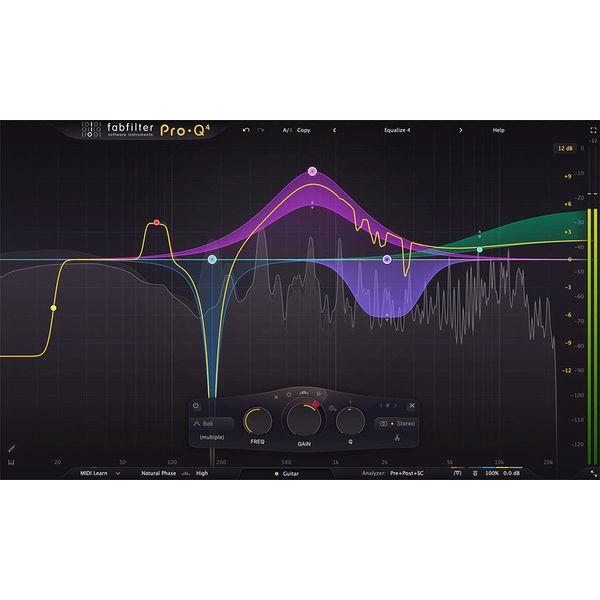
  • High-quality EQ for all applications with up to 24 bands
  • Dynamic EQ mode with adjustable attack and release time
  • Spectral Dynamic mode for treating problematic and harsh frequency ranges
  • Character modes for saturating the signal: Clean, Subtle and Warm
  • Instance list allows control of all Pro-Q 4 instances via a single plug-in interface
  • EQ Sketch allows you to draw the EQ curve
  • Per filter band L/R or M/S mode adjustable
  • Available filter characteristics: Bell, low and high shelf, low and high cut, notch, band-pass, tilt-shelf, flat-tilt and all-pass.
  • Slope can be set depending on the filter characteristic up to 96 dB/octave
  • LP/HP filter with brickwall characteristic
  • Spectral visualisation from any other Pro-Q 4 instance, including coverage detection
  • Three operating modes: Zero-Latency, Linear-Phase and Natural-Phase
  • Spectrum grab function with indication of the most important peaks for quick EQ settings
  • EQ Match allows you to match the output spectrum of another Pro-Q 4 instance
  • Advanced settings per band with Make Dynamic, Invert Gain, etc.
  • Solo function for individual bands
  • Fade-in piano roll for musical frequency display
  • Side-chain function for dynamic mode
  • Spectral dynamic mode and EQ match
  • Supports all major surround/immersive audio formats up to 9.1.6 Dolby Atmos
System Requirements
  • Version: 4
  • Shipping Format: E-Mail
  • License validity: perpetual
  • Copy Protection: Online Activation
  • Simultaneous Activations: 2
  • Windows: from Vista
  • Mac OS (64 Bit): from 10.13
  • CPU min.: Apple Silicon, Intel Core
  • CPU compatibility: Apple Intel, Apple Silicon, Windows AMD, Windows Intel
  • add. System requirements: Internet Connection for Installation and Activation
Supported Formats
  • AAX native 64-Bit
  • AU 64-Bit
  • VST2 32-Bit
  • VST2 64-Bit
  • VST3 32-Bit
  • VST3 64-Bit
  • Available since December 2024
  • Item number 607127
  • Sales Unit 1 piece(s)
  • Los artikel / bundelartikel Los artikel
  • Delay No
  • Dynamics No
  • Effect Filter No
  • Encoder/Decoder No
  • Equalizer Yes
  • Guitar amps/-effects No
  • Channel Strip No
  • Metering / Analysis / Correction No
  • MIDI-FX No
  • Modulation Effects No
  • Multieffect / Plugin-Host No
  • Overdrive/Distortion No
  • Preamp / Saturation No
  • Psychoacoustic tool / Enhancer / Exciter No
  • Restauration No
  • Reverb No
  • Special FX No
  • Summer / Mixing Consoles No
  • Tape Simulation No
  • Pitch Shifter / Harmonizer / Timestretching No
  • Transient Processing No
  • Vocoder / Vocal effect No
  • Mastering Tools Yes
  • Hardware Controller No
  • Download Yes
335,87 AED 83,19 €
Excluding VAT
The price in AED is a guideline price only
Since we ship from Germany, additional costs through taxes and customs may be incurred
Available immediately

45 Customer ratings

5 / 5

handling

features

sound/quality

computer utilisation

20 Reviews

EM
IF YOU DON'T HAVE PRO Q4, THEN IT'S TIME YOU READ THIS FRESH REVIEW
EXCUSE ME?! DID YOU SAY BASS?! 14.03.2026
I’ve been using Pro-Q 4 for quite some time now, & it's truly the go-to EQ for detailed work. Mostly use it for mixing, and the spectrum analyzer plus dynamic EQ features are insanely helpful for carving space in busy tracks. It’s also surprisingly lightweight on CPU even with multiple instances. Honestly, even though stock EQs in DAWs have significantly improved over the years, but Pro-Q 4 saves me time, and gives me comfort that my mix will translate better. If you've never watched the ads for Fabfilter plugins in general, you're absolutely missing out! Buy this plugin before it's too late (nothing is going to happen, just wanted to give you anxiety for fun).

It's the industry standard EQ plugin for a long list of excellent reasons. A lot of it is online! That's why I bought it and enjoying my time with it. You will too, when you waste time on due diligence (joking, always research, & when you finally decide & come back here again, you purchase it with a giant smile on your face).
features
handling
sound/quality
computer utilisation
2
0
Report

Report

E
Industry standard
EduAlonso 08.08.2026
it is the industry standard for a reason. Great quality, light, very flexible and dynamic. Can help polishing a vocal or a track without compromising its natural sound or adding color you don’t want. It just just enough of what’s needed, and of what you want. Great product!
features
handling
sound/quality
computer utilisation
0
0
Report

Report

VV
Industrial standard
Vlad Vilnev 29.09.2026
A wonderful, great-sounding, and flexible plugin with rich functionality and amazing logic that’s easy to understand even for a beginner. There’s nothing more to add here. Highly recommended!
features
handling
sound/quality
computer utilisation
0
0
Report

Report

google translate de
Unfortunately there was an error. Please try again later.
r
Für mich der EQ, zu dem ich immer wieder zurückkomme
redeemed73 02.09.2026
Der Pro-Q 4 ist für mich inzwischen eines der wichtigsten Werkzeuge in meinem Studio. Ich habe viele EQs ausprobiert und auch andere sehr gute Produkte im Einsatz, aber wenn ich einfach einen EQ öffnen und mich auf meine eigentliche Arbeit konzentrieren möchte, lande ich sehr häufig wieder beim Pro-Q 4.

Was ich besonders schätze, ist die Kombination aus extrem präziser Bearbeitung und einer Bedienung, die trotzdem unglaublich direkt bleibt. Man setzt einen Punkt, bewegt ihn, hört sofort die Veränderung und kann sehr schnell genau das erreichen, was man möchte. Dabei wirkt das Plugin trotz seiner vielen Möglichkeiten nie unnötig kompliziert.

Gerade beim Arbeiten mit größeren Arrangements finde ich die grafische Darstellung ausgesprochen hilfreich. Frequenzbereiche lassen sich sehr schnell erkennen und bearbeiten. Gleichzeitig verlasse ich mich natürlich nicht ausschließlich auf die Anzeige – entscheidend ist für mich immer, was ich tatsächlich höre.

Ein großer Pluspunkt sind für mich die vielen Möglichkeiten, einen EQ-Eingriff wirklich kontrolliert vorzunehmen. Ob kleine Korrekturen, gezielte Resonanzbearbeitung, Low- und High-Cuts oder größere tonale Eingriffe – der Pro-Q 4 lässt sich praktisch immer genau so einsetzen, wie ich es gerade brauche.

Besonders gut gefällt mir auch, wie flexibel das Plugin bei komplexeren Aufgaben wird. Funktionen wie dynamische EQ-Bearbeitung und die weitergehenden Analyse- und Bearbeitungsmöglichkeiten machen ihn für mich nicht nur zu einem klassischen „Bänder setzen und fertig“-EQ, sondern zu einem sehr vielseitigen Mixing-Werkzeug.

Ein Punkt, der mir im täglichen Arbeiten ebenfalls wichtig ist, ist die Bedienung. Viele Dinge sind dort, wo man sie intuitiv erwartet. Ich muss nicht lange in Menüs suchen, sondern kann meine Aufmerksamkeit auf den Klang und den Mix richten.

Gerade beim Produzieren mit vielen virtuellen Instrumenten ist das für mich enorm wertvoll. Ich arbeite teilweise mit sehr komplexen Arrangements und großen Instrumenten-Libraries. Da brauche ich Werkzeuge, die mir nicht zusätzliche Arbeit machen, sondern mir helfen, schneller zu einer klaren Mischung zu kommen.

Auch beim CPU-Verbrauch bin ich mit dem Pro-Q 4 sehr zufrieden. Natürlich hängt die tatsächliche Belastung vom jeweiligen Projekt und den verwendeten Funktionen ab, aber für die Möglichkeiten, die das Plugin bietet, empfinde ich es als sehr effizient.

Was mir am Pro-Q 4 letztlich am meisten gefällt, ist aber gar nicht eine einzelne Funktion. Es ist dieses Gefühl, dass der EQ einfach funktioniert. Ich öffne ihn nicht und denke darüber nach, wie ich das Plugin bedienen muss. Ich denke darüber nach, was ich mit dem Klang machen möchte.

Genau das ist für mich bei einem Mixing-Plugin entscheidend.

Ich verwende den Pro-Q 4 deshalb sowohl für kleine chirurgische Korrekturen als auch für größere tonale Eingriffe. Er ist für mich kein Spezialwerkzeug, das nur bei bestimmten Problemen zum Einsatz kommt, sondern ein EQ, den ich praktisch in jedem Projekt einsetzen kann.

Mein Fazit: Der FabFilter Pro-Q 4 ist für mich eines dieser Plugins, die man irgendwann nicht mehr als „Plugin“ wahrnimmt, sondern einfach als Bestandteil des eigenen Studios. Er ist schnell, präzise, extrem flexibel und trotzdem angenehm zu bedienen.

Ich habe mittlerweile viele Werkzeuge in meinem Studio – aber wenn ich einfach einen EQ brauche und nicht lange überlegen möchte, welchen ich nehmen soll, ist der Pro-Q 4 sehr oft meine erste Wahl.

Für mich ein absoluter Studio-Klassiker und ganz klar 5 Sterne.
features
handling
sound/quality
computer utilisation
0
0
Report

Report